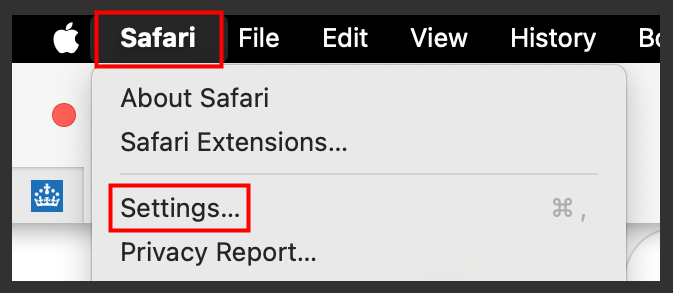
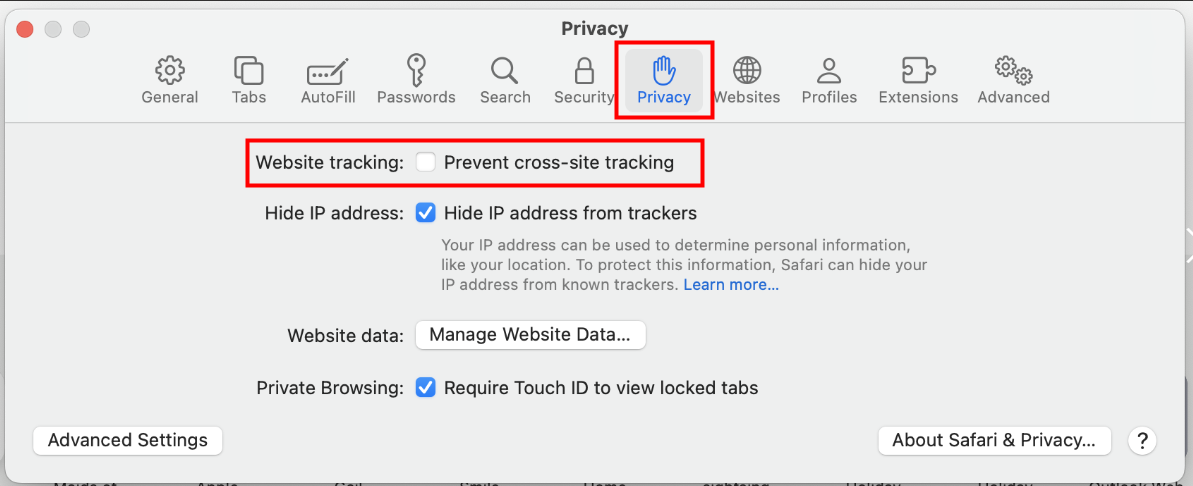
Yes, you can use a Mac to access and work on the REF Hub but we recommend changing this setting:
|  |
|  |
If you still have issues signing in or using the REF Hub when you are using Safari then we recommend using a different browser on your Mac, for example Google Chrome.
We have also had a report that having iCloud Private Relay switched on may cause performance issues when using the REF Hub. See this article from Apple on how to switch this feature off.
If you continue to have any problems in another browser please contact us at usersupport@ref.ac.uk.
Explanation: Internet browsers use cookies to store information about your session. Microsoft 365 will have cookies to remember which user you are when you're opening new windows, like opening an Outlook window, and then from Outlook opening a Teams window to join a meeting. However, Safari has a feature to prevent "cross site tracking" and we believe this may cause the session to be lost/forgotten when opening different windows for different apps.
We want to make these articles as helpful as possible so please use the Yes/No buttons below to send us feedback.
Was this article helpful?
That’s Great!
Thank you for your feedback
Sorry! We couldn't be helpful
Thank you for your feedback
Feedback sent
We appreciate your effort and will try to fix the article