Help on the REF systems

Modified on Mon, 6 Oct at 8:53 AM

To access the knowledge base click the Systems help link on the Hub home page. 


The knowledge base is full of solution articles and guidance to help you use the REF systems. 

Ignore the Login option in the top right-hand corner of the screen as there is no need to log in to the knowledge base.


This article covers:

  • How to open a solution article
  • How to search for help
  • How to give feedback about an article
  • What to do if you can't find the help you need


Open a solution article

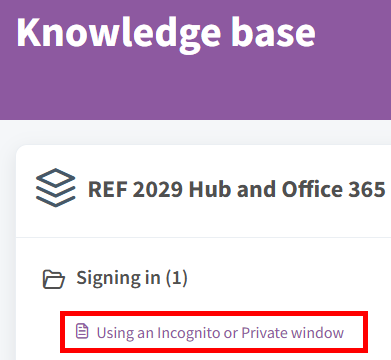
  • The articles are organised in to folders to help you find what you need. If you can see the article you want then click on it to open it.
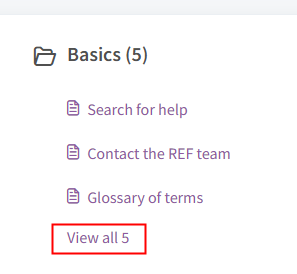
  • You may need to click to view all articles in that section 


Search for help

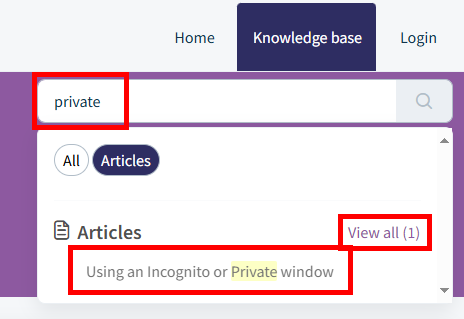
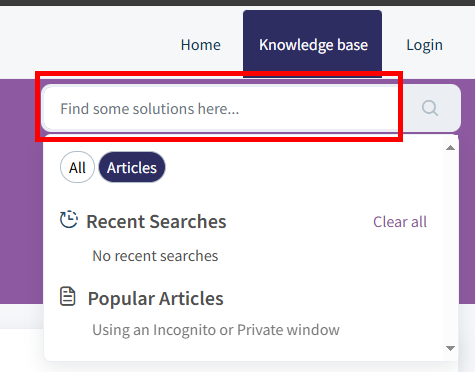
  • Type your search in to the Finds some solutions here.. box, (the system will search the article title and contents)
  • A list of relevant articles will appear
  • Click on search result to open the solution article
  • You can also click on View all to see a list of relevant articles
  • When you click in the search box it will also show your recent searches and popular articles


Give feedback about an article

  • At the bottom of each article you'll find a feedback option 
  • Please do use this to let us know if the article was helpful or not as we will be monitoring the feedback to help us improve the solution articles
    • If you click on No you will be prompted for a few more details so we know how we can improve the solution article


I can't find the solution article I need

  • If you can't find the solution article/help you need please contact the REF team on usersupport@ref.ac.uk.
  • We monitor all the queries we get and we'll add new solution articles when necessary


Was this article helpful?

That’s Great!

Thank you for your feedback

Sorry! We couldn't be helpful

Thank you for your feedback

Let us know how can we improve this article!

Select at least one of the reasons
CAPTCHA verification is required.

Feedback sent

We appreciate your effort and will try to fix the article