How to watch a video file in the REF Hub

Modified on Mon, 1 Dec at 3:26 PM

To watch a video file, such as a meeting recording or system guide, in the REF Hub, please follow the instructions below:


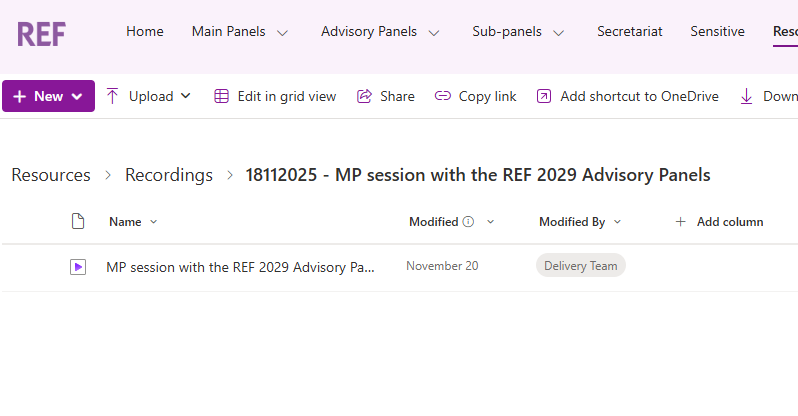
  • Navigate to the desired file in SharePoint
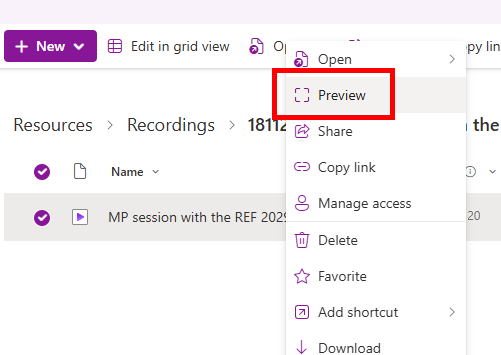
  • Right-click on the video you want to watch, and click Preview
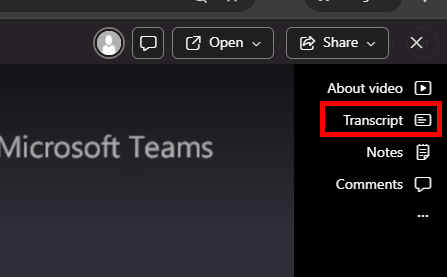
  • This will open a video player in the browser 
  • You can view the transcript of the video (if available) by clicking Transcript in the top-right hand corner


We want to make these articles as helpful as possible so please use the Yes/No buttons below to send us feedback.

Was this article helpful?

That’s Great!

Thank you for your feedback

Sorry! We couldn't be helpful

Thank you for your feedback

Let us know how can we improve this article!

Select at least one of the reasons
CAPTCHA verification is required.

Feedback sent

We appreciate your effort and will try to fix the article